vanillaappsFind your app
← All apps

Privacy & consent

Vanilla Consent

Clear choices. Better privacy records.

Create a cookie banner that fits your store, connect choices to Shopify privacy controls, scan selected pages and manage verified privacy requests in one place.

Free plan available

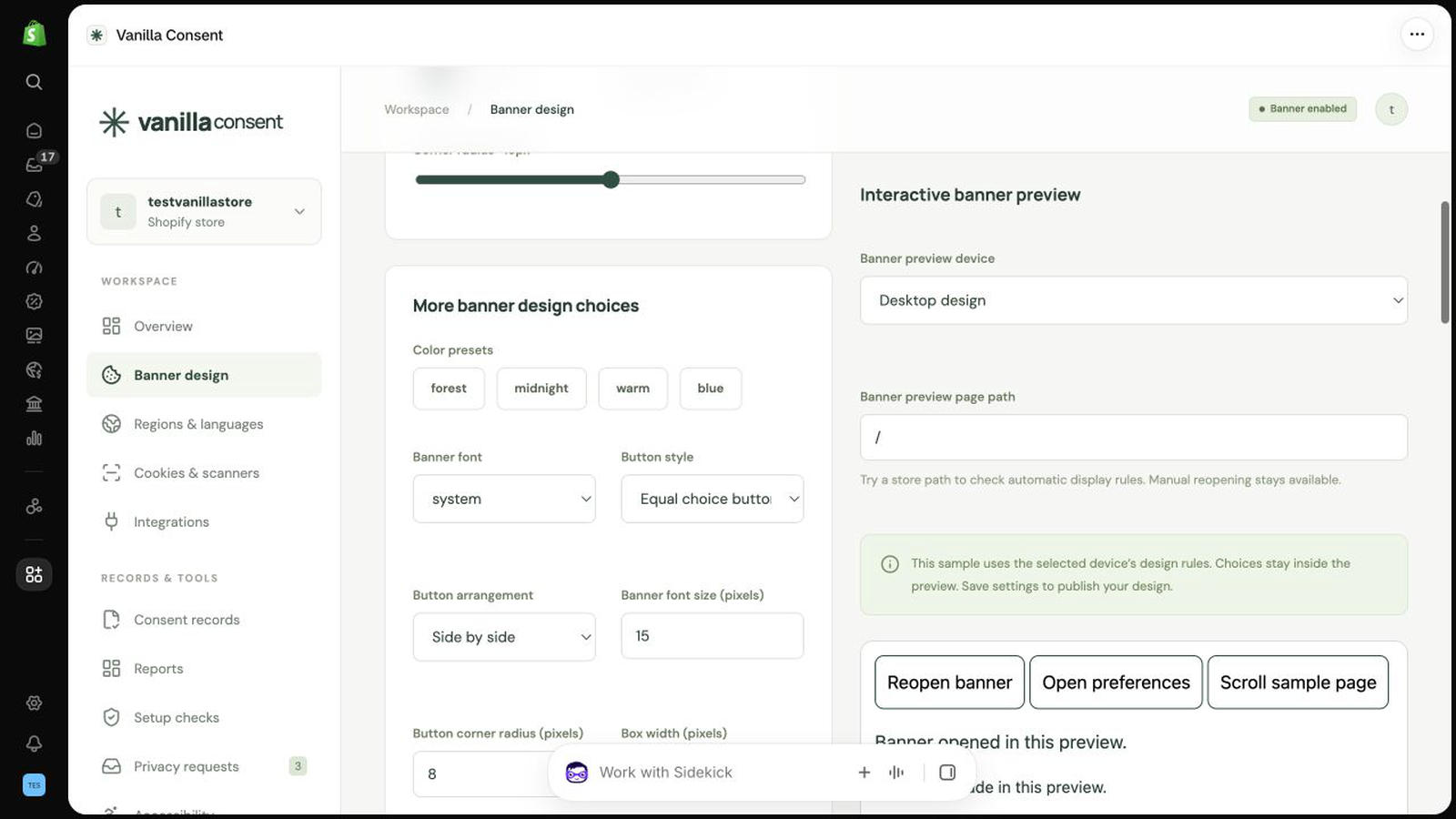
Style and preview a banner inside Shopify admin.Take a closer look

Inside Consent

The details that
make the difference.

01

Make consent feel part of your store

  • Choose from five banner styles and customise colours, fonts, logo and button layout.
  • Preview desktop and mobile layouts before publishing.
  • Let shoppers accept, reject, choose categories and reopen their preferences.
  • Connect choices to Shopify’s Customer Privacy API.
02

Adapt to language and location

  • Set country and region rules with geolocation.
  • Edit banner translations for all 24 EU language codes.
  • Use AI translation drafts within your allowance, with merchant review.
  • Manually preview location and language behaviour.
03

Understand what runs on your store

  • Scan selected public pages for cookies and accessibility findings.
  • Compare initial, rejected and accepted consent states.
  • Maintain a cookie inventory and review suggested categories.
  • Gate reviewed scripts and iframes by consent category. Unknown trackers are not automatically guaranteed to be blocked.
04

Keep a useful record

  • Retain consent events with timestamps and policy snapshots.
  • Filter records and export CSV reports.
  • Review consent, request and setup reports.
  • Give shoppers a route to submit and verify privacy requests.
05

Handle requests with care

  • Manage access, deletion, correction, portability and other privacy requests.
  • Review identity and request details before taking action.
  • On Full, use reviewed Shopify customer tools and expiring, single-use export delivery links.
  • Connect supported email services for request notifications and delivery. Setup and permissions are required.
06

Go further with Full

  • Schedule scans and receive alerts.
  • Review AI cookie classification and image alt-text drafts.
  • Import consent records, privacy-request history and cookie inventory with validation.
  • Compare banner variants with A/B testing.
  • Configure age checks, reading tools, cookie cleanup and reviewed withdrawal actions.
  • Configure supported consent signals and integrations for your store. These require setup and do not imply CMP certification.

See it in action

Real app. Real screens.

Select a screenshot to enlarge it.
Example stores shown.

Style and preview a banner inside Shopify admin.Enlarge screenshot
01Style and preview a banner inside Shopify admin.
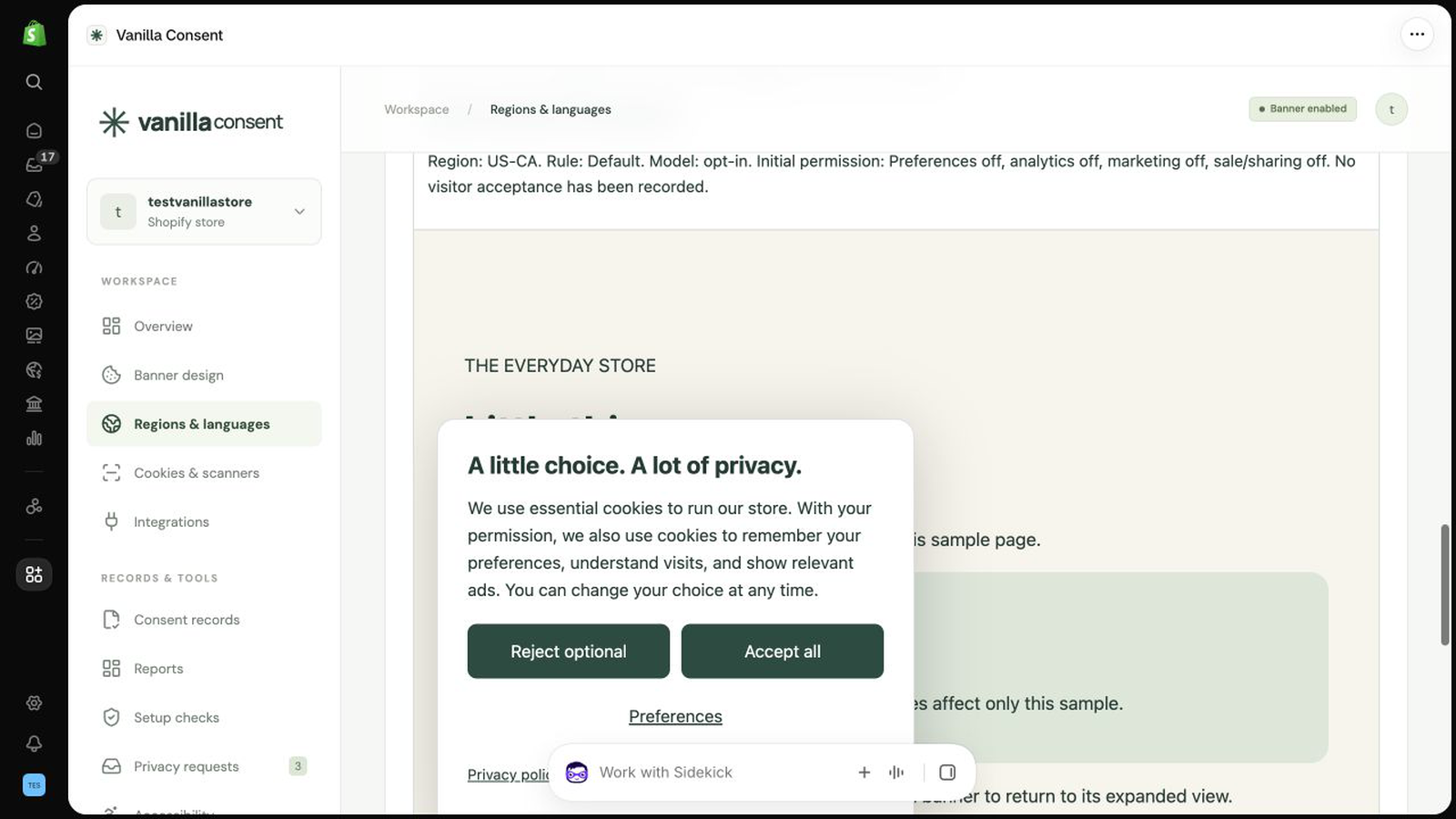
Set region rules and language choices.Enlarge screenshot
02Set region rules and language choices.
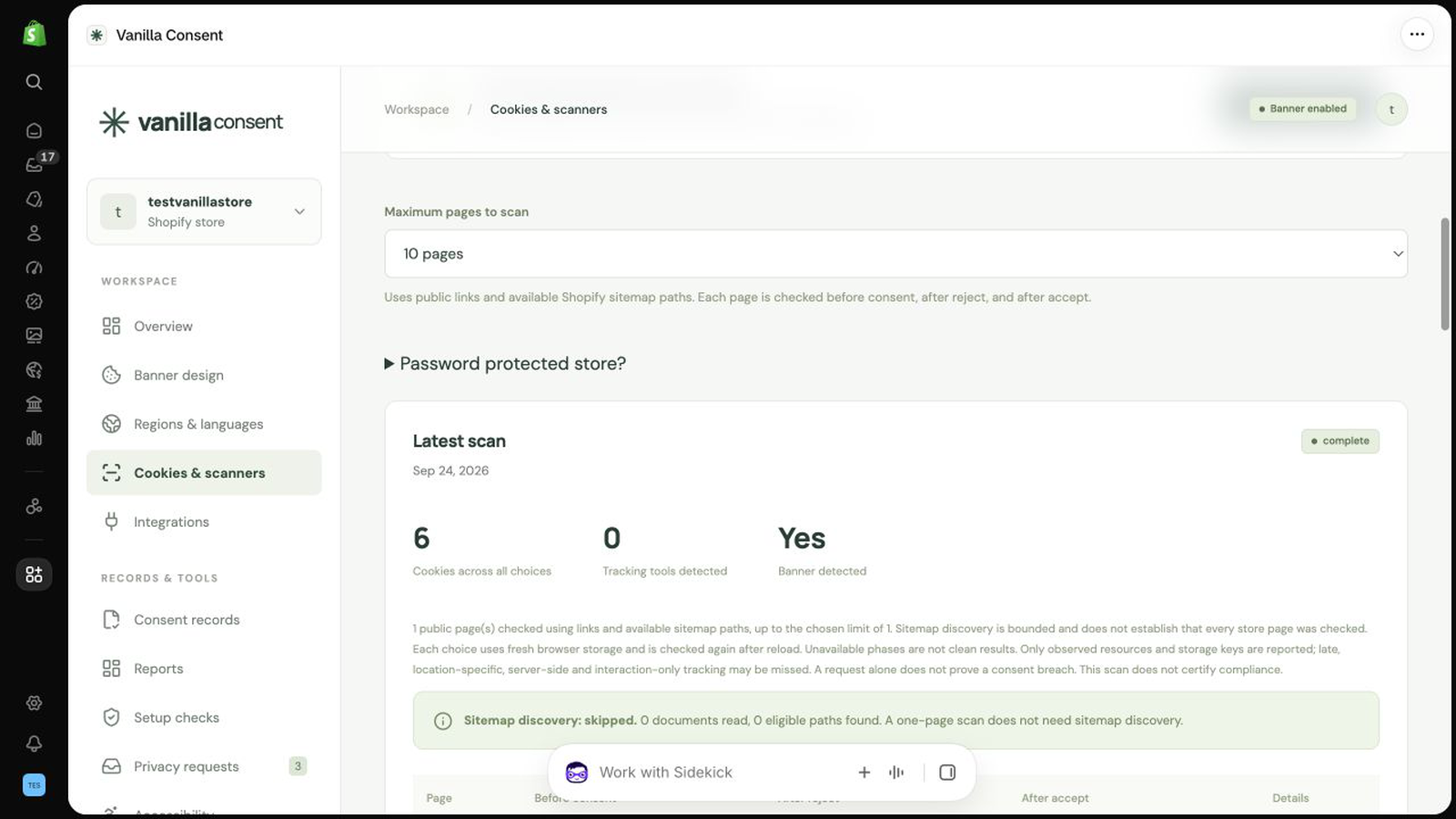
Review findings from a storefront scan.Enlarge screenshot
03Review findings from a storefront scan.

Find your fit

Simple, clear pricing.

Free

FreeNo monthly charge

  • Unlimited banner impressions
  • Five styles, geolocation and editable EU languages
  • Privacy requests, consent logs and basic blocking
  • 30 scan pages / month
  • 20 AI translation drafts / month
Get Consent

Full

$19USD / month

  • Everything in Free
  • Scheduled scans, alerts and A/B testing
  • Reviewed Shopify tools and secure export links
  • 300 scan pages + 200 AI translation drafts / month
  • 50 AI cookie batches / month, up to 20 cookies each
  • 500 AI image drafts / month
Get Consent

Full is $19 USD per month through Shopify. No banner impression fees or automatic overage charges. Scan retries and AI attempts use the allowance. Manual translation edits are unlimited. Connected services may have their own charges.

Your first steps

Get up and running.

  1. 01

    Install the app and enable its theme embed.

  2. 02

    Choose banner styling, regions, languages and your privacy links.

  3. 03

    Review scripts and cookies, run a scan, and test accept, reject and withdrawal on your storefront.

A few useful answers

Before you start.

Need help with your store?

Email app support

Read the help guide

App privacy policy

Does the banner block every tracker automatically?

No. Shopify privacy controls and reviewed script or iframe gates must be configured for your store. Test your theme, pixels and connected apps, especially third-party code.

Do I have to pay for every visitor?

No. Both plans include unlimited banner impressions. Scans and AI drafts have monthly allowances, shown above. There are no automatic overage charges.

Are accessibility tools a compliance certificate?

No. Scans, reading tools and reviewed alt-text suggestions help you find and improve issues. They do not certify accessibility or legal compliance.

How do I get support?

Email helpdesk@vanilla.net.mt with your app name, store’s .myshopify.com address, the steps you took and a screenshot with private details removed. Never send passwords or access tokens.

People behind the product

Need a hand?
Talk to our team.

From choosing an app to getting it set up,
we’re here to help.

Get app support